
How to Identify Your iPhone Model
If you're not sure which iPhone model you have, we'll show you how to find out.
Look for the model number in the list below using one of these three methods.
1
Method #1: Settings
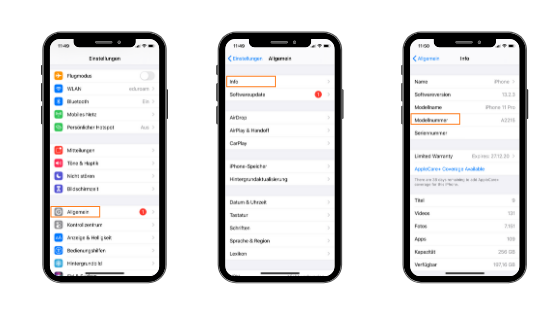
You can find your model number in the Settings.
Go to Settings → General → About
Find the model number in the fourth position
Tap once on the number to get the A-model number
Tip: One line above you'll also find your model designation.
2
Method #2: Back of iPhone
On the back of your iPhone, you'll find a section with small printed text and various pictograms.
Look for small text on the back of your iPhone
Find the model number starting with letter "A"
Followed by a four-digit number combination

3
Method #3: Packaging
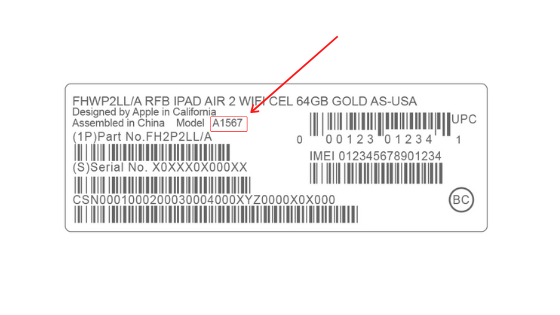
On the bottom of your iPhone packaging, you'll find a sticker with various information.
Check the bottom of your iPhone box
Look for a sticker with product information
Find the model number starting with "A" + four digits
Found Your Model Number?
Now that you know your iPhone model, you can easily find repair prices and services for your specific device.
View Repair ServicesContact Us
ManbijTech
Burgstr,33 53177 Bonn Bad Godesberg
+4917641534277
info@manbijtech.de
6 days a week from 9:00 AM to 6:00 PM
+4917641534277
info@manbijtech.de
6 days a week from 9:00 AM to 6:00 PM